I just finished doing a mirror alignment, but now the red dot is way off—especially when the head is far from the source. At that distance, the laser doesn’t even hit the mirror on the laser head. Any advice on how to fix this? Thanks in advance!
1 Like
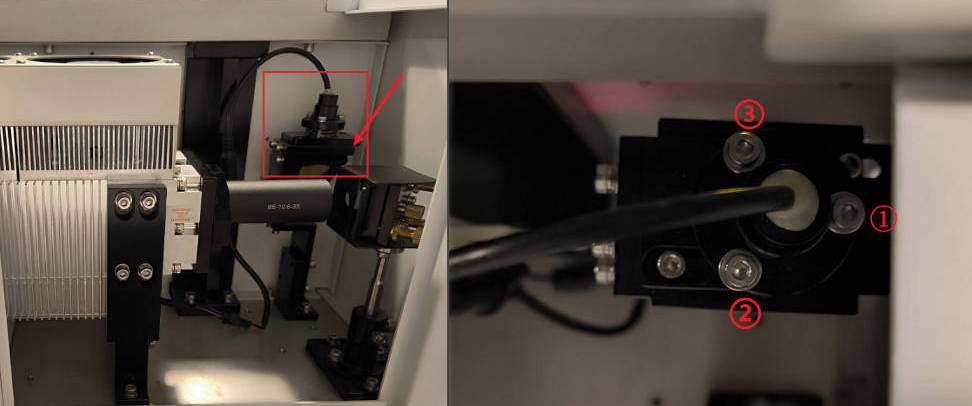
Right behind Mirror 1, there’s a beam combiner that merges the laser beam with the red dot.
Use the three adjustment screws on top of the combiner to carefully tilt and align the red dot until it matches your laser path.
First, examine the burn marks on the tape to confirm that the actual laser path is centered on and consistent across all mirrors. If this requirement is met, you do not need to adjust the mirrors any further; you only need to calibrate the red light path separately.
As shown in the figure, locate the red light indicator. You will need an M3 hex screwdriver to make the adjustments.
-
Screw 1: Adjusts the red light horizontally (Left/Right).
Rotate clockwise to move the red light path to the right.
Rotate counter-clockwise to move the red light path to the left. -
Screw 2: Adjusts the red light diagonally (Upper-Right/Lower-Left).
Rotate clockwise to move the red light path down-and-left.
Rotate counter-clockwise to move the red light path up-and-right. -
Screw 3: Adjusts the red light diagonally (Upper-Left/Lower-Right).
Rotate clockwise to move the red light path up-and-left.
Rotate counter-clockwise to move the red light path down-and-right.
The adjustment is complete when the red dot precisely overlaps with the laser burn mark.